

Collaborators & access levels
Add people or organizations to your experiment, choose between Can view and Can edit, and handle requests to join.
Experiments are meant to be shared. Everyone you share an experiment with directly appears in one list, and each row carries one setting: how much they can do.
The list is that set of direct shares — users, teams and organizations someone added on purpose. It is not a full audit of who can open the experiment: members of the organization that owns it reach it through their organization role, and a public experiment is readable by anyone.
Those people are not simply missing. Owners of the owning organization are named individually; its admins and members appear as counted summary rows; anyone who also holds a share is broken out into their own row and subtracted from those counts; and public readers get no row at all. A row may also carry a Redundant grant badge, meaning the share adds nothing to access the person already has.
Who can access your work? explains the whole model in one page — the three routes in, why the strongest wins, and how to read a row. Start there if someone has access you cannot account for.
The two access levels
- Can view — open the experiment, read its data and visualizations, and contribute: take measurements with the mobile app, and add annotations and comments. This is usually the person in the field.
- Can edit — everything above, plus the experiment's settings, publishing, archiving, and managing who else has access.
What each level can do
| Action | Can view | Can edit |
|---|---|---|
| See the experiment, its data and visualizations | ✓ | ✓ |
| Take measurements with the mobile app | ✓ | ✓ |
| Add annotations, comments and flags | ✓ | ✓ |
| Upload measurement data on the web | ✓ | ✓ |
| Add or edit experiment metadata | – | ✓ |
| Edit experiment settings (name, description, visibility) | – | ✓ |
| Create and edit visualizations | – | ✓ |
| Attach or change the workbook, and edit locations | – | ✓ |
| Add or remove collaborators and change their level | – | ✓ |
| Archive the experiment | – | ✓ |
Being added is what lets someone contribute. Making an experiment public lets anyone read it — it never lets a stranger add measurements or annotations. Only people who hold an access level on the experiment can contribute, which is why the lowest level is still called "Can view" rather than "read-only".
Email addresses are shown only where needed. You can see your own address. Organization owners and admins can see their organization's members' addresses. Someone managing an experiment can see the address on a pending request to join it, but managing the experiment alone does not reveal collaborators' addresses. An experiment invitation's address is visible only to the person who sent it. Organization invitations have a separate rule: that organization's owners and admins can also see their invitees' addresses. Other people appear without an address. Inviting by an exact email address still works.
Invite a collaborator
Open your experiment and go to the Collaborators tab, then select Invite. One search field covers every way of adding someone:
- A user — search by name or exact email and select them. They get access immediately at the level you choose. The search shows up to 20 matching people. They hear about it in their notification bell, with an email while Membership and access is switched on under Account → Notifications. Changing their level later, or removing them, reaches the bell too, with no email.
- An organization — switch Share with to Organization and pick one of your own. Everyone in that organization gets the level you choose.
- Someone by email — type their full address. If no account appears, choose Send invite by email. They join at the chosen level when they next sign in, creating an account first if needed. If the address matches an existing account, select the person instead. The result says Matches the email you entered without showing a hidden address. They get access immediately.
Choose the access level in the same dialog. New collaborators default to Can view, which is the level that lets them contribute.
The Collaborators tab groups people into three sub-tabs:
- Collaborators — the users and organizations the experiment is shared with directly, each with their level.
- Invited — pending email invitations, each showing the level it will confer, who sent it and the date. These details help distinguish invitations when their addresses are hidden. Hidden invitations also show a short reference so you can tell apart invitations sent by the same person on the same day. Revoke one before it is accepted and re-invite if you need to change that level.
- Requests — pending requests to join (see below).
The filter above the tabs narrows all three lists at once.
Requests to join a public experiment
Anyone viewing a public experiment they are not part of can select Request to join, with an optional message. People who can manage the experiment see these under the Requests sub-tab and can Approve or Reject them. Approved people join with Can view, so they can start contributing.
Join codes
Approving thirty people one at a time does not work in a workshop. A join code
is the way round it: an eight-character code, shown as XXXX-XXXX with a QR
beside it, that anyone signed in to the Android app can enter to join the
experiment straight away. No request, no approval. They join with Can view,
the level that lets them measure.
Join code sits beside Invite above the collaborator list, and opens a window with everything the code needs. The button only appears on a public experiment that is not archived, and only for people who can manage access. A private experiment has no button at all; publish it from the Overview tab first, and note that publishing cannot be undone. While a code is live the button carries the number of people who have used it, so you can see that without opening anything.
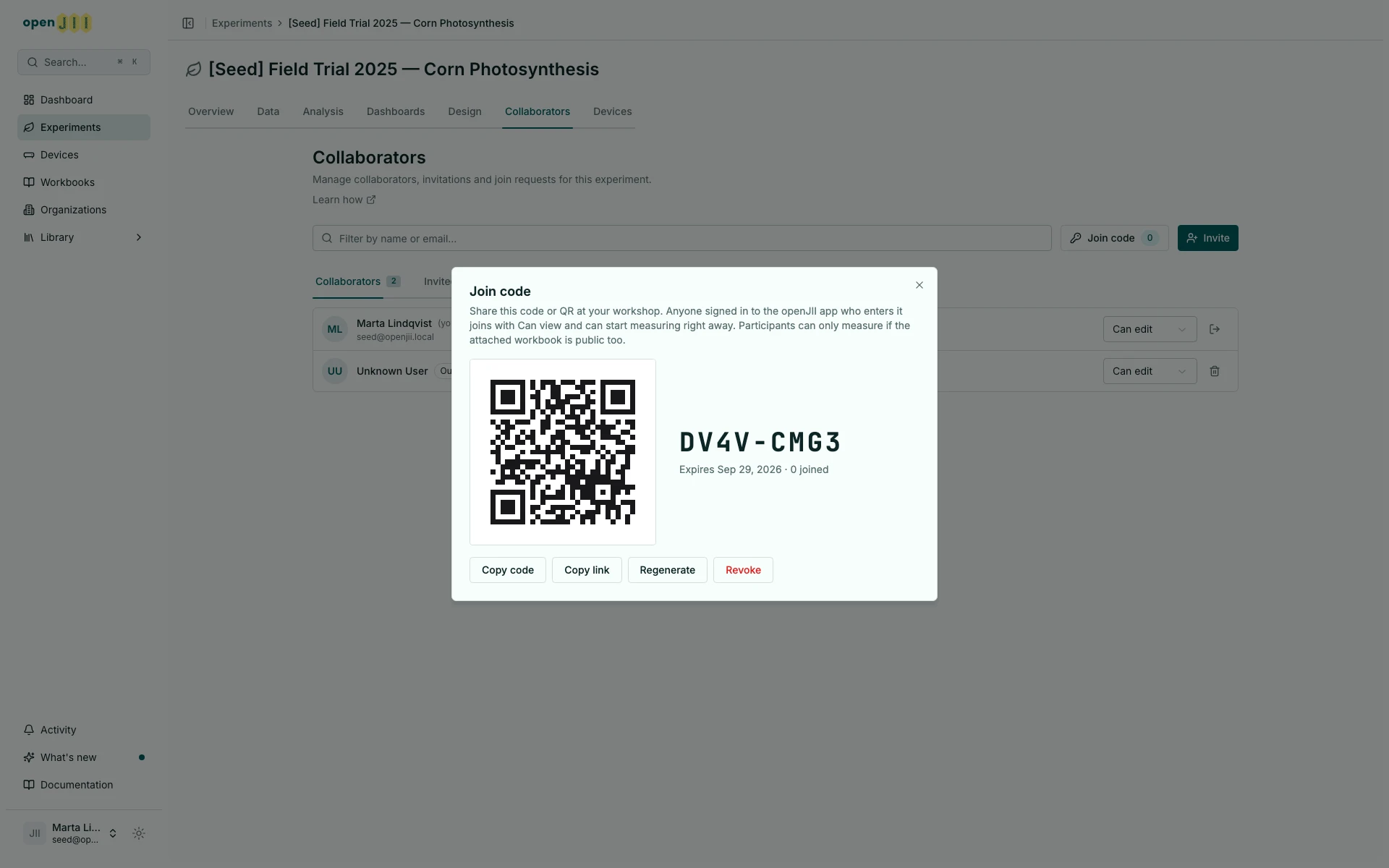
Participants can only measure if the attached workbook is public too. The code grants Can view on the experiment, which says nothing about the workbook behind it. A participant who joins a public experiment whose workbook is private gets as far as the measurement screen and is told the workbook is not shared with them. Check the workbook's visibility before the workshop.
Creating, sharing and ending one
Open Join code, pick how long the code should last, then select Create join code. The choices are 1 day, 7 days, 30 days, and no expiry; 7 days is the default. The window then shows the code in large type, its QR, the expiry date and how many people have used it. That counter updates on its own while the window is open, so you can leave it projected during a session and watch the number climb.
Copy code copies the code itself, for reading out or writing on a whiteboard. Copy link copies the address the QR encodes, which is a page that hands the visitor to the app. Both stay valid until the code expires or you end it.
An experiment has one active code at a time.
- Regenerate issues a new code and stops the old one. The confirmation asks how long the new code should last, preset to the current code's lifetime.
- Revoke stops the current code without issuing another.
Either way, anyone who already joined keeps their access. Ending a code only closes the door behind them, which is what makes regenerating between two workshops safe.
An expired code is not deleted. The window shows a banner naming it and the date it ran out, with the expiry picker and Create a new code beside it, and the count disappears from the button.
What participants see
The QR encodes a public page showing the code as text, a link that opens the app, and a link to the Play Store for anyone who does not have it yet. The code itself is the fallback: it can always be typed in by hand. Their side of this is in Join an experiment from the app.
Changing a level, removing someone, leaving
From the Collaborators sub-tab, change anyone's level with the dropdown on their row, or remove them with the bin button next to it. Your own row is marked (you) and its button is Leave, which gives up your own access.
Some rows carry an Outside Collaborator label. That is information, not a restriction: it marks a person or organization from outside the organization that owns the experiment, so you can see at a glance who is external. What they can do still comes from their access level.
What has to hold is that the experiment stays administrable — not that it keeps a Can edit collaborator. While the organization that owns it still has an owner, that owner is in full control, so you can remove or lower anyone here, including the last Can edit. The refusal appears only once that organization has no owner left and this row is the last person who could still administer the experiment — a shared organization does not count. The reason is shown when it does.
Removing someone takes away this access. They may still be able to reach the experiment another way — through the organization that owns it, through an organization or team they belong to that was also given access, or because the experiment is public. The confirmation dialog says so; check those routes too if the intent is to remove access entirely.
Who can see the list
The collaborator list, the pending invitations and the access levels are only visible to people who can manage access — that is, holders of Can edit and owners and admins of the owning organization. Everyone else sees the experiment's contributor credit (names and avatars) and nothing about who holds which level.
If you hold Can view, the Collaborators tab shows you a Your access card instead of the list, with a Leave button for giving up your own access.
For access to macros, protocols, workbooks and devices, see Sharing & Collaboration — those resources use the same two levels on their own Collaborators tab, except that a device is never publishable.