

Writing macros
Read measurements and workbook context, then return analysis-ready values.
A macro is a data-processing script: it turns a measurement or earlier workbook values into a JSON object of named results. openJII stores Python, JavaScript, and R macros. On the web, the backend runs each language in its own isolated Lambda sandbox. The mobile field flow runs JavaScript locally and Python in Pyodide; an R macro fails on the phone with a "cannot run on this device" message instead of running.
JavaScript runs on the phone without a connection. The app downloads the Pyodide runtime from the internet before it can run a Python macro. If that runtime has not loaded when the phone goes offline, the result step says the macro needs an internet connection instead of showing its output. The reading can still be accepted, and the platform runs the macro once the measurement uploads. A macro that must give results in the field without a connection should be written in JavaScript.
Open Macros and select New macro to choose a language, write the code, and optionally associate compatible protocols. You can also create or select a macro while adding a Macro cell to a workbook. Put the macro after the values it needs, then run the workbook with representative data.
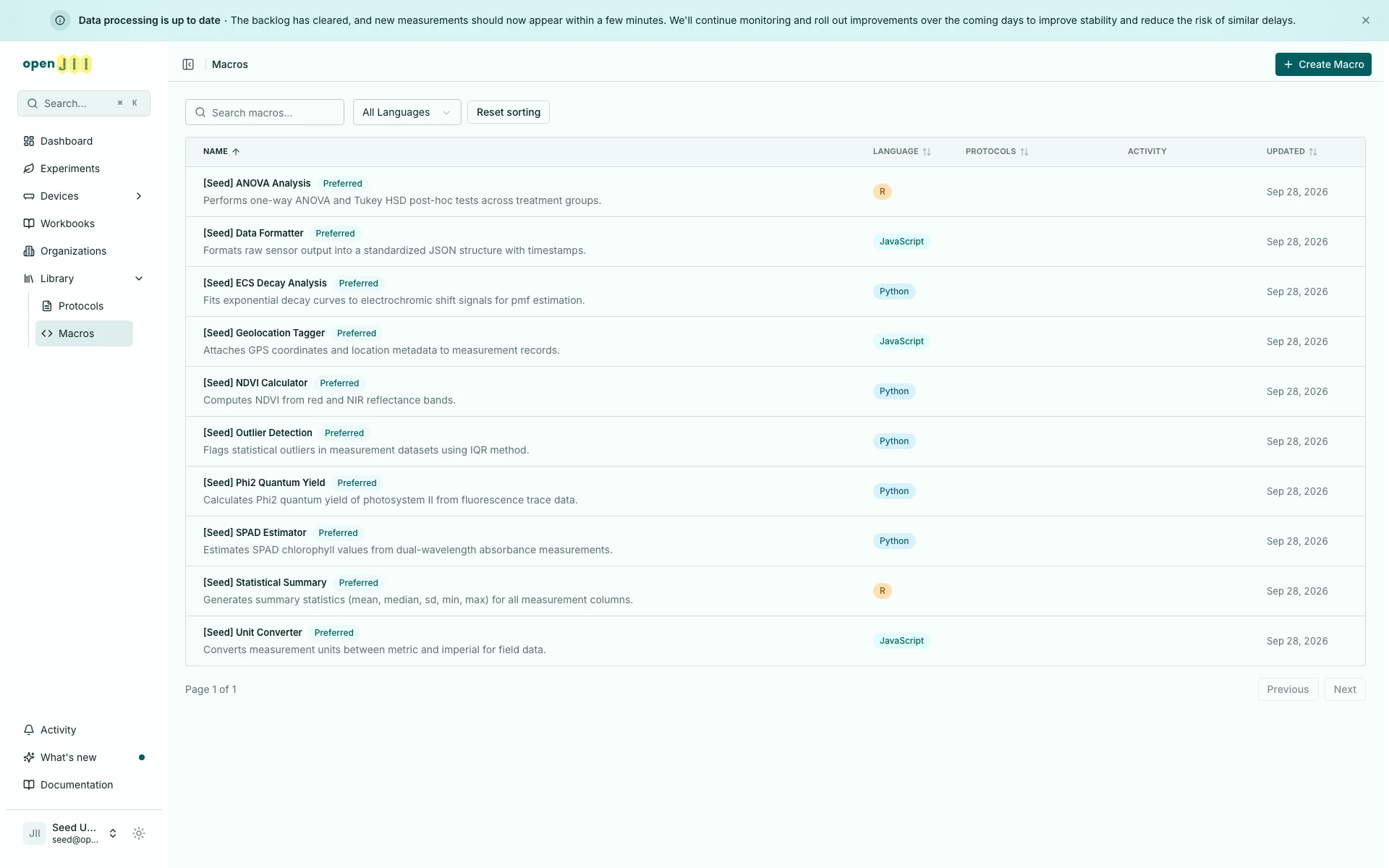
Create a macro (opens in a new tab)Sort the macro list
On the Macros page, select Name, Language, Protocols, or Updated to sort the list. Click once for ascending order, again for descending order, and a third time to clear that column. Hold Shift to add a second sort. The selected order stays in the URL, so a refresh or shared link keeps it. Reset sorting clears the selection and returns to the default order.
In a phone-width browser window the list shows only the Name column, so Name is the only heading you can select there; the other columns appear as the window widens. A sort chosen in a wider window, or carried in a shared link, still applies while its column is hidden.
Know the macro inputs
| Name | What the macro receives |
|---|---|
json | The canonical triggering measurement value: normally the nearest preceding output, scoped to the device whose macro is running. Compatibility envelopes are projected before macro code runs. |
ctx | Completed upstream questions, protocols, commands, and macros keyed by canonical workbook name. Names are lowercased, punctuation becomes underscores, and duplicate names resolve to the nearest upstream value. |
| Return value | A JSON-serializable object: a Python dictionary, JavaScript object, or R list. Its keys become the macro output available to later cells and data processing. |
Older JavaScript and Python macros add their values to a predefined output
object instead of returning one. The platform and the phone both accept that:
when a macro returns nothing, its output is what it added to output. A macro
that creates its own output must still return it.
Question values use an { answer: ... } object. Named protocol, command, and
macro entries contain their output object. Only upstream cells are included;
the macro cannot read itself or a later cell. The host passes ctx itself to
macro code; there is no ctx.byId API.
Treat json as one measurement
Write macros against the direct measurement value. In particular, do not
write json.sample[0]: the legacy transport envelope is not part of the macro
authoring contract.
The backend single and Databricks batch hosts, and the mobile JavaScript and
Python host, call the shared normalizer for every input. The call is
unconditional; the normalizer reshapes only a plain top-level object with its
own sample property whose value is a JSON object or array:
| Value presented to a host | Value macro code receives |
|---|---|
| Direct object | The same value |
Direct scalar or null | The same value on the phone; see the note below |
{ sample: [measurement] } | measurement |
{ sample: measurement } | measurement when it is a JSON object |
Root array, including [] or multiple items | The complete, unchanged array |
{ sample: [] } | An empty-envelope failure; macro code is not run |
{ sample: [first, second] } | first |
The backend only accepts a JSON object or array as a macro's input. A direct
scalar or null sent to the macro API is refused with HTTP 400 before the
normalizer or the macro runs, and the field app refuses to save a measurement
that is a scalar or null. Only the phone's own run can hand a scalar or null
to macro code.
Intentional root-array behavior change. On generic backend calls, web
workbooks, and mobile JavaScript or Python runs, a root array is no longer
treated as a compatibility envelope. A macro now receives [] as an empty
array and [first, second] as the complete two-item array. A macro that wants
one element must select that element itself.
Databricks Gold processing is the deliberate compatibility exception. Its
legacy producer wraps a source root array as { sample: data } before calling
the backend batch host. The normalizer therefore sees a sample envelope and
keeps the existing first-measurement behavior; an empty source array becomes
{ sample: [] } and fails as an empty envelope. This adapter behavior preserves
existing Gold results while the generic backend, web, and mobile contract moves
to whole root arrays.
For a multi-entry sample envelope, the host discards later entries and emits an
operational additional-items-discarded warning. The warning contains only the
operational metadata needed to identify the run, envelope source, and entry
counts, never measurement content. Batch execution fails an empty item
independently and still runs its valid siblings.
Projection is shallow: the normalizer inspects only that own top-level sample
property and never traverses nested values. A selected value that is itself
sample-shaped passes unchanged rather than being projected again. Root arrays
stay whole when exposed as json, as an entry in ctx, or to a workbook branch
condition. Raw protocol and output values remain unchanged in storage and
transport.
Start with the triggering measurement in Python
The variable is named json, but in Python it is the measurement dictionary,
not the standard-library module:
readings = json["readings"]
mean_reading = sum(readings) / len(readings)

return {
    "mean_reading": mean_reading,
    "reading_count": len(readings),
}
Use keys that are stable in the selected protocol's output. Return a dictionary even for one value so downstream cells and exported tables have named fields.
In Python, convert NumPy values with float(), int() or .tolist() before
returning them, and use None rather than NaN. A value JSON cannot carry fails
that measurement's macro with an error saying so, and the other measurements
still run.
Read earlier workbook values with ctx
Name the producing cells Baseline and Stress. Their canonical keys are
baseline and stress:
baseline = ctx["baseline"]["value"]
stress = ctx["stress"]["value"]
device = ctx.get("$device", {})

return {
    "change_from_baseline": stress - baseline,
    "device_id": device.get("id"),
}
For a question named Treatment group, read
ctx["treatment_group"]["answer"]. Names beginning with a number gain a
question_ prefix; choose simple, unique cell names rather than depending on
that fallback.
In multi-device runs, each macro invocation receives the upstream results for
that same device. ctx["$device"] can contain family, id, name,
firmwareVersion, batteryPercent, and zero-based index when the host knows
them. Keep the device ID in the output when it is useful for auditing, but do
not use the connection index as a permanent device identifier.
Run from context only
The web workbook runner can execute a macro with no preceding measurement when
at least one upstream ctx value exists. In that case, json is an empty
dictionary. An answer-driven Python macro can therefore be as small as:
treatment = ctx["treatment_group"]["answer"]

return {
    "treatment": treatment,
    "is_control": treatment == "control",
}
This ctx-only execution is a web workbook capability. Test the full mobile flow separately before relying on it during field work.
JavaScript equivalent
JavaScript receives the same json and ctx contract:
const baseline = ctx.baseline.value;
const current = json.value;

return {
  change_from_baseline: current - baseline,
  device_id: ctx.$device?.id ?? null,
};
R macros receive json, ctx, and an output environment in the web sandbox;
return an R list. The direct-value form is the same:
baseline <- ctx$baseline$value
current <- json$value

return(list(change_from_baseline = current - baseline))
Use the web workbook runner to test R macros because the mobile runner currently selects only JavaScript or Python.
When you select a language in a workbook macro cell, the selection takes effect after saving succeeds. If saving fails, the cell keeps its previous language.
The language is pinned into each workbook version together with the macro code. The field app, and the platform when it processes uploaded measurements, run the code and language pinned in the experiment's version. Versions created before the language was pinned hold only the code; for those, the language saved on the workbook's macro cell is used, even if the macro itself has since moved to another language. The web workbook runner always runs the macro's current code and language, so a macro that works there can still run with an old language in the field.
If an experiment runs a macro with the wrong language:
- Open the workbook and select the right language in the macro cell itself. Changing the language only on the macro's own page does not count as a change to the workbook, so no new version would follow.
- On the experiment's Design tab, select Review & upgrade to move the experiment to a new version that pins the corrected language. See Workbooks.
- A measurement recorded under a workbook version keeps that version. The platform processes it, and the app re-runs it from Recent, with that version's language. Upgrading changes only what comes next.
Runtimes and available libraries
Where a macro runs decides which libraries you can rely on. The web sandboxes ship scientific libraries and a shared helper library; the mobile Python runtime is deliberately minimal.
| Runtime | Language | Libraries available |
|---|---|---|
| Web sandbox (backend Lambda) | Python 3.12 | numpy (np), pandas (pd), scipy, plus the openJII helper library |
| Web sandbox (backend Lambda) | JavaScript (Node) | The openJII helper library (no npm packages; no Date, require, or eval) |
| Web sandbox (backend Lambda) | R | Base R and jsonlite, plus the openJII helper library |
| Mobile app (Pyodide) | Python | Python standard library only: no numpy/pandas/scipy and no helper library |
Write mobile-run Python macros against the standard library only. If a macro
needs numpy, pandas, scipy, or the helper functions below, keep it on the
web workbook runner.
Helper utilities
In every web runtime (Python, JavaScript, R) openJII injects a shared helper library, callable directly by name. It mirrors the PhotosynQ macro helpers so existing analysis code ports over. The main families:
- Arrays:
ArrayNth,ArrayRange,ArrayZip,ArrayUnZip. - Statistics:
MathMEAN,MathMEDIAN,MathMIN,MathMAX,MathSUM,MathSTDEV,MathSTDEVS,MathSTDERR,MathVARIANCE,MathROUND,MathLN,MathLOG. - Regressions:
MathLINREG,MathPOLYREG,MathMULTREG,MathEXPINVREG. - Protocol lookup:
GetIndexByLabel,GetLabelLookup,GetProtocolByLabelto pull values out of a measurement by its protocol label. - Domain:
TransformTrace,calcSunAngle. - Messages:
info,warning,dangerto attach notes to a result.
readings = json["readings"]

return {
    "mean": MathMEAN(readings),
    "stdev": MathSTDEV(readings),
    "fit": MathLINREG(ArrayRange(1, len(readings) + 1), readings),
}
These helpers are not available in the mobile Pyodide runtime; use plain Python there.
Treat ctx as read-only
The host constructs ctx from shared upstream state, so never assign into it.
Enforcement differs by runtime:
- Web Python recursively converts dictionaries to
MappingProxyTypeand lists to tuples. - Web JavaScript deep-clones and recursively freezes
ctx. - Web R locks the
ctxbinding; R's copy-on-modify behavior isolates nested changes for each item. - Mobile JavaScript structured-clones and recursively freezes
ctx. - Mobile Pyodide currently receives a JSON-deserialized Python dictionary. It is not frozen, so the read-only contract depends on macro discipline there.
The triggering json measurement is separate from ctx. Do not mutate either
input; create and return a new result object.
Test before publishing
- Use a saved measurement with the same keys and nesting the protocol will produce.
- Test missing, empty, and boundary values explicitly.
- Add the macro after its producers in a workbook and check every canonical
ctxname. - For multi-device work, confirm each result uses the matching device's measurement and identity.
- Confirm the returned object contains only JSON-serializable values.
- Run on both web and mobile if the workbook will be used in both places.
For the measurement recipe that feeds a macro, continue with Writing protocols. For the security and infrastructure rationale, see ADR: Execute macros in isolated language sandboxes.