

Visibility & embargo
Choose public access now or a time-limited private embargo.
New experiments are Public by default. Choose Private during creation when the data needs a temporary embargo.
Public
A public experiment can be viewed by anyone, not just its collaborators. Reading is all that public visibility grants: contributing measurements and annotations still requires being added as a collaborator. Once an experiment is public, the interface warns that it cannot be changed back to private.
Private under embargo
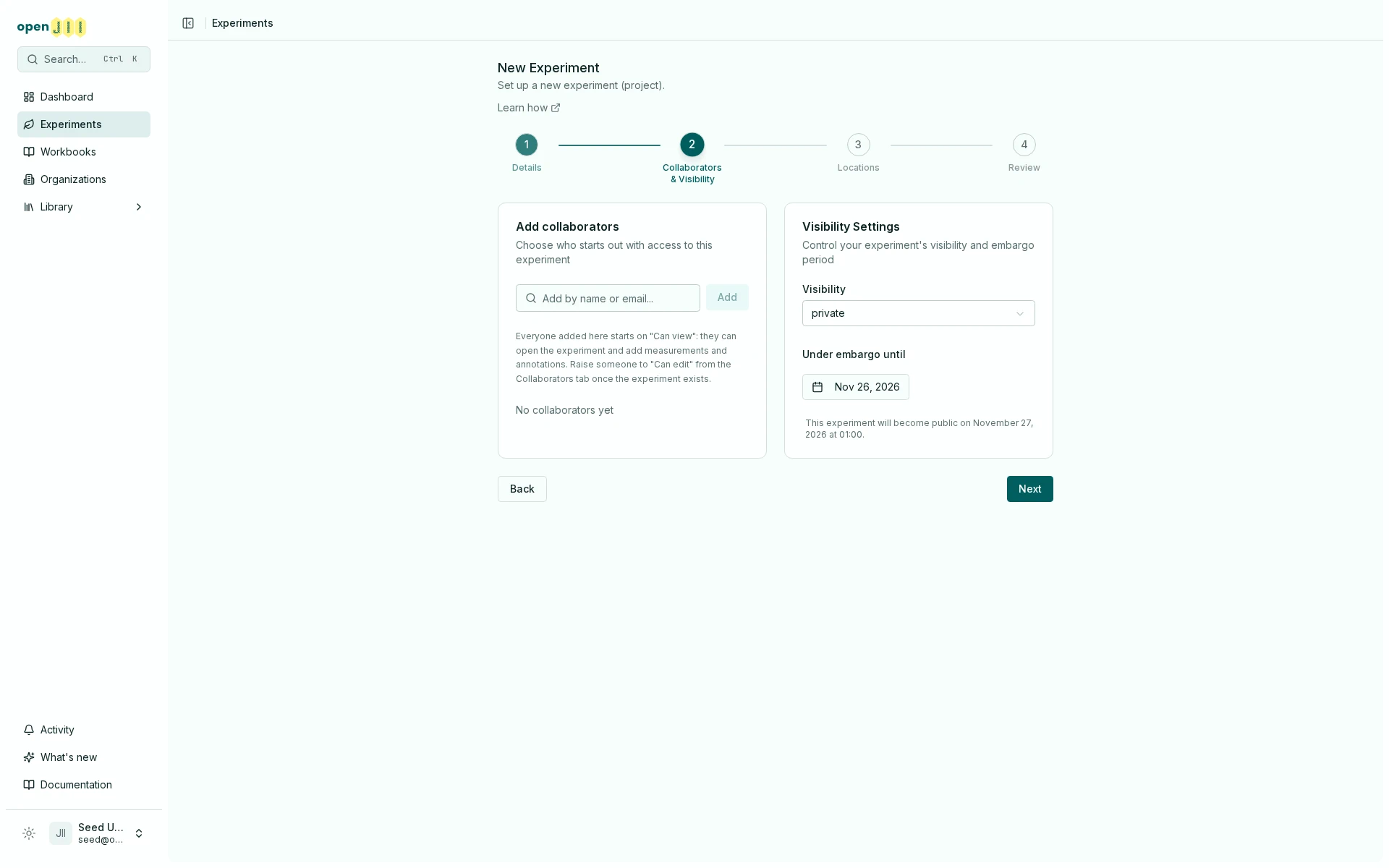
A private experiment requires an embargo end date:
- the date must be tomorrow or later;
- it must be no more than 365 days from today;
- the create flow suggests a date 90 days ahead when none is set;
- an automated backend job checks expired embargoes daily at midnight UTC and changes them to public.
Because the job runs daily, treat the embargo date as the end of a protected period rather than a promise of publication at a precise local minute.
Set or review visibility
- During experiment creation, open Collaborators & Visibility.
- Choose Public or Private.
- For Private, set the embargo end date and read the calculated public date.
- Review the setting before selecting Create Experiment.
Anyone with Can edit can later review visibility in experiment settings. Moving from private to public is presented as irreversible.
Before making data public, check descriptions, metadata, contributor identity, annotations, and exports. Visibility is an access setting, not a publication review workflow.