

Access troubleshooting
Start from what you are seeing — someone has access they shouldn't, someone lost access they should have, or an invite went nowhere.
Each symptom below says what you see, why it happens, and what to change. If you would rather learn the model than chase a symptom, read Who can access your work? instead — it is short.
Symptoms
- Someone can edit a resource I never shared with them
- I removed someone from the organization and they still have access
- I removed them from a team and they still have access
- I can't remove this person from the Collaborators page
- Their name isn't listed, but they have access
- This person can't be selected, or the level is greyed out
- Why can Can view add measurements?
- I made the organization public — why is my experiment still private?
- I can't move my resource out
- Access changed after I moved the resource
- I invited someone and nothing happened
- It won't let me delete my account
- It won't let me delete my organization
Someone can edit a resource I never shared with them
What you see — a person editing an experiment whose Collaborators tab has no row for them, or a row that says only Can view.
Why — they are an Owner or Admin of the organization that owns it, which carries full control without any share. Or they hold Can edit some other way: a share in their own name, a share given to a team they belong to, or a share given to a whole organization they belong to.
What to change — decide which route you actually want to cut, because they are independent. Change their role in the owning organization, or remove the specific share. Removing the row does nothing if their access came from their role.
I removed someone from the organization and they still have access
Why — organization membership was not their only route. A share held in their own name survives, and so does one held by a team or another organization they belong to. If the resource is public, they can read it like anyone else.
What to change — open the Collaborators tab. They will now be labelled Outside Collaborator; remove the row. If there is no row, check whether the resource is public, and whether a team or organization they belong to holds a share.
I removed them from a team and they still have access
Why — the team share was one route among several. Their organization role, or a share in their own name, is still in force.
What to change — see Who can access your work? for the list of routes and how to close each one.
I can't remove this person from the Collaborators page
Why — their access is not a share, so there is no share to remove. Owners of the owning organization are listed for transparency, and admins and members appear inside summary rows; none of those are removable from here.
What to change — manage it in the organization instead: change their role or remove them from it. See People and roles.
Their name isn't listed, but they have access
Why — the Collaborators list does not name everyone. Owners of the owning organization are named individually, but admins and members are summarized as counted rows ("12 admins, through the organization"), and public readers get no row at all.
What to change — nothing is wrong. To see who is inside a summary row, open the organization's Members screen.
This person can't be selected, or the level is greyed out
Why — the share would add nothing to what they already have. Someone who is already an Admin of the owning organization holds full control, so no share can raise them.
What to change — nothing, usually. If you want them to have less, that is a change to their organization role, not a share.
Why can Can view add measurements?
Why — on experiments only, the lower tier deliberately carries contribution: being given access to an experiment is what makes someone a contributor. Organization Members get the same. On macros, protocols, workbooks and devices, Can view is read-only.
Public visibility is different: a stranger reading a public experiment can never contribute.
I made the organization public — why is my experiment still private?
Why — these are two separate controls that happen to use the same two words. Organization visibility decides whether the organization is listed in the directory. Resource visibility decides whether the resource can be read by anyone.
What to change — publish the resource itself from its own visibility setting.
The two are not symmetrical in risk. An organization can be made private again at any time. Publishing an experiment cannot be undone — check before you publish, not after.
I can't move my resource out
Why — one of the two sides failed. You need Owner or Admin of the organization losing it, and you need to be able to create in the destination. Devices cannot be moved at all, whoever you are.
What to change — see Moving a resource.
Access changed after I moved the resource
Why — moving withdraws every team share on the resource, and swaps which organization's roles apply. Shares held by a person or by an organization survive.
What to change — re-share with a team in the destination organization if a group lost access.
I invited someone and nothing happened
Why — one of three things:
- They have not accepted it yet. An invitation is never accepted for them — whatever the role, and however they sign in — so it sits on Invited until they select Accept on their own Account → Invitations tab, which the email link takes them to. Signing up from the invitation email does not accept it either; the invitation is still there afterwards.
- The address is wrong. Invitations match on the email address, not the person, so an address they never use will never resolve — and their Invitations tab, which lists only what was sent to the address they sign in with, will look empty to them.
- It expired. Expired invitations have to be sent again.
What to change — check the address on the Invited tab first; that is the usual cause.
It won't let me delete my account
Why — deletion is blocked while other people would be left stranded. Two cases: you are the last Owner of a shared organization, or you are the last person who can administer a resource.
What to change — the dialog lists exactly what is blocking you. Promote another Owner in each organization, or hand over the resources it names, then try again.
Your personal workspace is never listed as an organization blocker — everyone permanently and solely owns their own, so it would block every deletion on the platform. Work owned by it is a different matter: you are the only person who can administer anything in your personal workspace, so each such resource is listed, and the only way to clear it is to give someone else Can edit on it. There is no second Owner to promote.
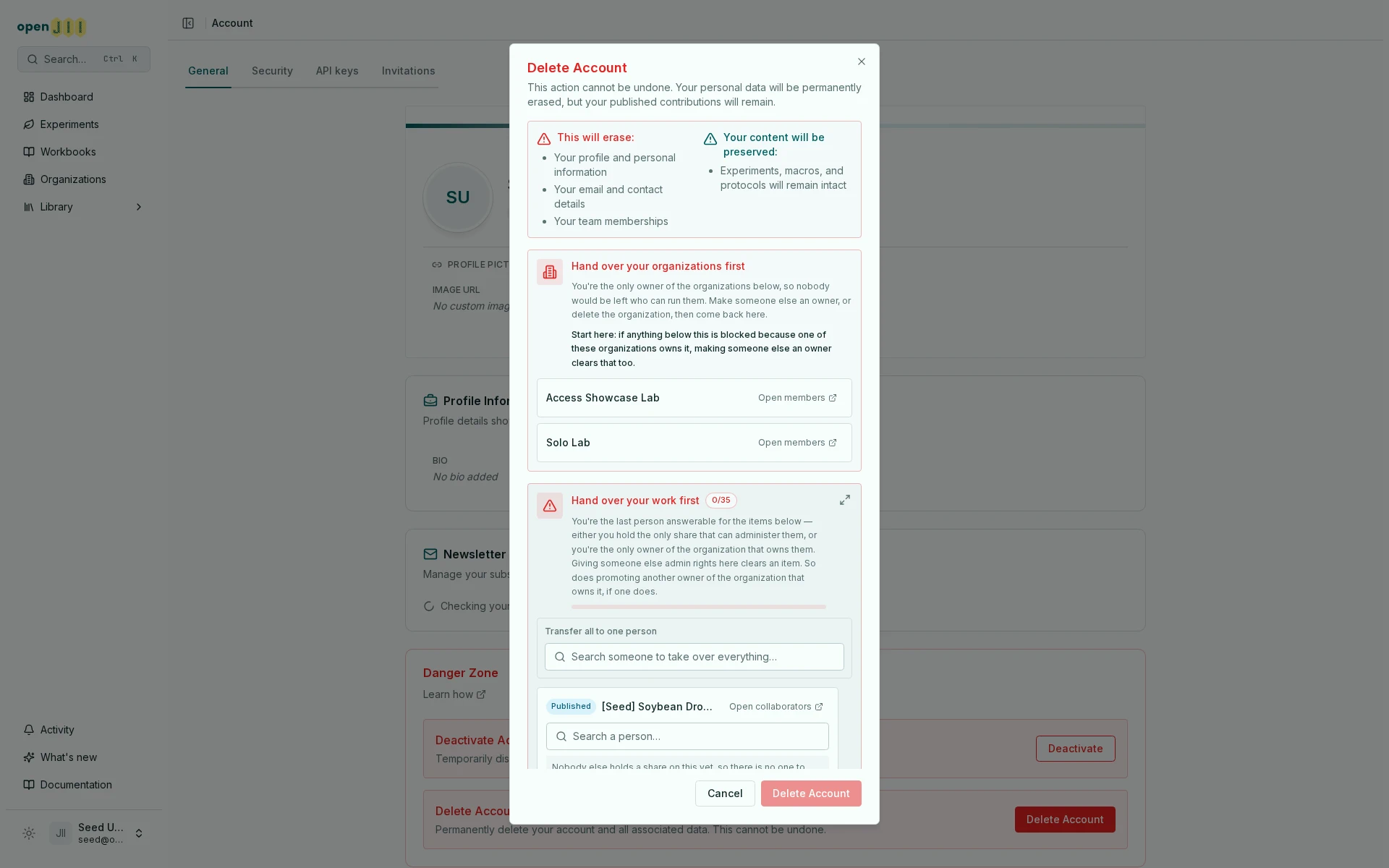
Both can be blocking at once, and they often have the same cause: an experiment owned by an organization you are the only Owner of is blocked because you are its only Owner. So start at the top — promoting a second Owner of the organization usually clears the resources under it as well.
It won't let me delete my organization
Why — it still owns work. Deletion never destroys the work behind a single dialog, so it is refused while any experiment, macro, protocol, workbook or device remains.
What to change — transfer out what you want to keep and delete the rest. Devices must be deleted, since they cannot be moved. See Delete an organization.